Projekt pre Arduino Mega
Hľadač piesní
Malé zariadenie, ktoré päť sekúnd počúva hudbu, cez internet rozpozná skladbu a zobrazí jej názov a interpreta na LCD displeji. Dolný riadok ukazuje živé spektrum zvuku.
- 16 pásiem
- 20 snímok za sekundu
- 5 s nahrávka
Čo to je
Equalizer, ktorý vie pomenovať pieseň
Hľadač piesní spája zvukový senzor, Arduino Mega, LCD displej a online službu na rozpoznávanie hudby. Stlačíš tlačidlo a Arduino päť sekúnd nahráva zvuk z okolia. Nahrávku pošle počítaču, ten ju odošle službe AudD a tá vráti názov skladby a interpreta. Výsledok sa zobrazí v hornom riadku displeja. Dlhší text sa po riadku posúva, aby sa dalo prečítať každé slovo.
Dolný riadok displeja pracuje samostatne. Arduino v ňom stále zobrazuje 16 stĺpcov, každý pre jedno frekvenčné pásmo, od basov vľavo po výšky vpravo. Stĺpce poskakujú podľa toho, čo práve hrá, takže displej funguje aj ako malý equalizer.
Arduino Mega nemá internet ani dosť výkonu na rozpoznávanie skladieb, preto sa o prácu delí s počítačom.
Číta tlačidlo, vzorkuje zvukový senzor, kreslí na LCD a počíta spektrum.
Prijme nahrávku, pošle ju službe AudD a výsledok vráti na displej.
Média
Ako to vyzerá naživo
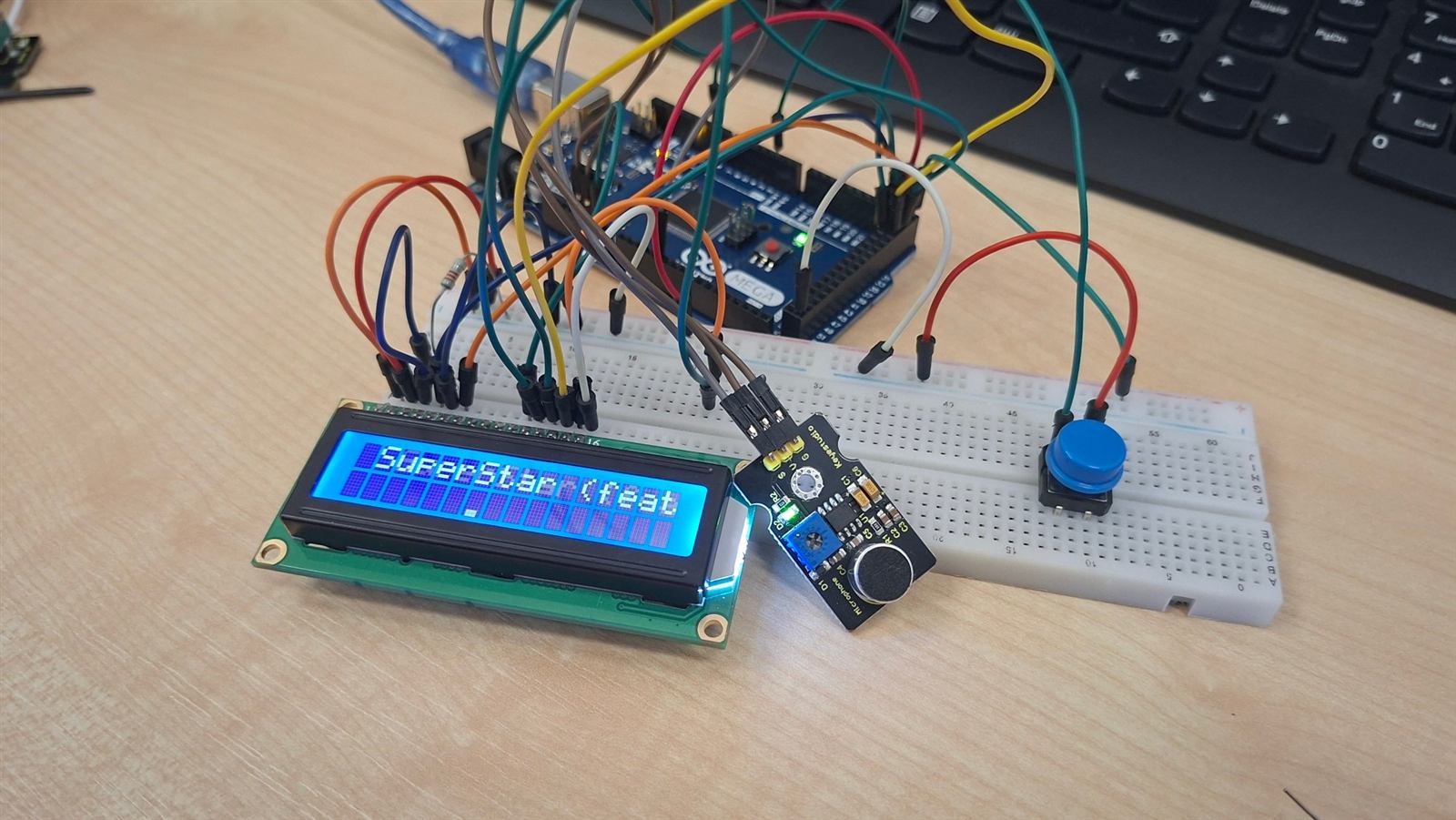
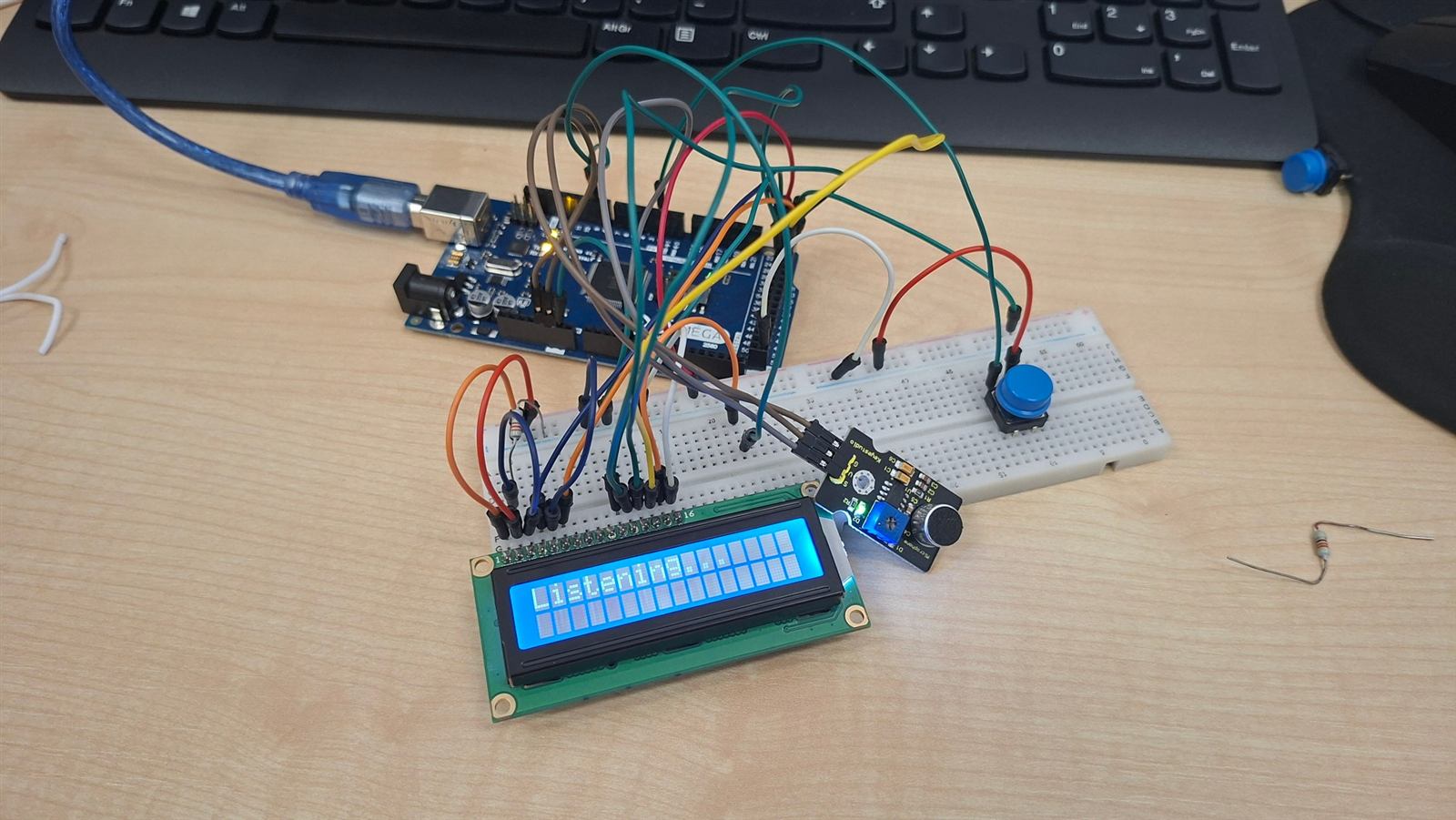
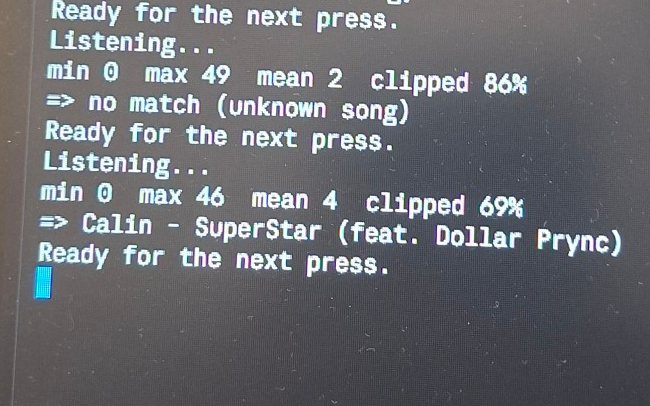
Hardvér
Čo potrebuješ
Riadi všetko a komunikuje s počítačom cez USB.
Analógový mikrofón. Trimer na ňom mení zosilnenie.
Čip HD44780 s 16 pinmi, bez I2C modulu.
Spustí počúvanie.
Kontrast displeja. Alternatívou sú rezistory 4,7 kΩ a 1 kΩ.
Obmedzuje prúd podsvietenia.
Zapojenie bez spájkovania.
Softvér a účty
- Arduino IDE. Knižnica LiquidCrystal je jeho súčasťou.
- Python 3 s balíkmi
pyserial,numpyarequests. - Počítač s Windowsom a pripojením na internet. Ovládanie citlivosti klávesmi používa funkciu, ktorá je len vo Windowse.
- Bezplatný účet na audd.io a API kľúč.
Hardvér
Zapojenie
Všetko sa zapája na nepájivom poli. Najdôležitejšie je správne poradie pinov displeja. Displej beží v 4-bitovom režime, takže piny 7 až 10 (D0 až D3) nechaj nezapojené.
LCD displej 16×2
| Pin LCD | Označenie | Zapojiť na |
|---|---|---|
| 1 | VSS | GND |
| 2 | VDD | 5V |
| 3 | V0 | stredný vývod potenciometra (kontrast) |
| 4 | RS | Mega pin 22 |
| 5 | RW | GND |
| 6 | E | Mega pin 23 |
| 7 až 10 | D0 až D3 | nezapojené |
| 11 | D4 | Mega pin 24 |
| 12 | D5 | Mega pin 25 |
| 13 | D6 | Mega pin 26 |
| 14 | D7 | Mega pin 27 |
| 15 | A (podsvietenie +) | cez rezistor 220 Ω na Mega pin 9 |
| 16 | K (podsvietenie −) | GND |
Zvukový senzor
| Pin senzora | Zapojiť na |
|---|---|
| G | GND |
| V | 5V |
| S | Mega pin A4 |
Trimer na senzore nastavuje zosilnenie. Pri hlasnej skladbe by hodnota max vo výpise programu mala byť aspoň okolo 50.
Tlačidlo
Štvornohé tlačidlo má nožičky spojené po dvojiciach. Zapoj ho uhlopriečne: jednu nožičku na Mega pin 2 a protiľahlú na GND. Rezistor netreba, program zapína vnútorný pull-up.
Podsvietenie a kontrast
Rezistor 220 Ω vedie z vývodu A na pin 9, ktorý vie meniť jas. Kontrast nastavíš potenciometrom medzi 5V a GND so stredným vývodom na V0. Bez neho urob delič: 4,7 kΩ z 5V na V0 a 1 kΩ z V0 na GND. V0 priamo na GND je maximálny kontrast, pri ktorom sa písmená strácajú v štvorčekoch.
Softvér
Služba AudD
AudD je online služba na rozpoznávanie hudby. Pošleš jej krátku nahrávku, stačí pár sekúnd, a vráti názov skladby, interpreta, album a odkaz. Nahrávku porovnáva so zvukovými odtlačkami skladieb vo svojej databáze.
Ako získať kľúč
- Zaregistruj sa na dashboard.audd.io.
- Na hlavnej stránke dashboardu nájdeš svoj
api_token. Skopíruj ho. - Po registrácii máš skúšobné obdobie, v ktorom môžeš API vyskúšať zadarmo. Aktuálne limity a ceny sú v dashboarde.
Ako vyzerá požiadavka
Stačí jeden HTTP POST na https://api.audd.io/ s poľom api_token a súborom v poli file.
import requests

r = requests.post(
    "https://api.audd.io/",
    data={"api_token": "SEM_VLOZ_SVOJ_TOKEN"},
    files={"file": open("nahravka.wav", "rb")},
)
print(r.json())
{
"status": "success",
"result": {
"artist": "Tears For Fears",
"title": "Everybody Wants To Rule The World",
"album": "Songs From The Big Chair",
"release_date": "2014-11-10",
"timecode": "00:56"
}
}Keď AudD skladbu nepozná, pole result je null a program zobrazí „No match, try again“. Pri zlom kľúči vráti chybu authorization failed.
host/audd_token.txt, ktorý Git ignoruje.
Princíp
Ako to funguje
- Zvukový senzormikrofón KS0035
- Arduino Megavzorky, LCD, tlačidlo
- Počítačprogram recognize.py
- AudDdatabáza skladieb
Jedno rozpoznanie krok za krokom
- Stlačenie tlačidla. Arduino zobrazí „Listening...“ a päť sekúnd vzorkuje senzor na pine A4: 8 000 vzoriek za sekundu, 8 bitov na vzorku, spolu 40 000 bajtov.
- Prenos do počítača. Arduino pošle hlavičku
AUDIO 40000a hneď za ňou surové bajty cez USB rýchlosťou 250 000 baudov. - Úprava zvuku. Počítač odpočíta jednosmernú zložku, pretože senzor je v pokoji blízko nuly. Potom signál zosilní na plnú hlasitosť a uloží ho ako 16-bitový súbor WAV.
- Rozpoznanie. Počítač odošle WAV službe AudD a čaká na odpoveď.
- Zobrazenie. Počítač pošle text „názov - interpret“ späť na Arduino. Písmená s diakritikou nahradí obyčajnými, lebo font displeja ich nemá. Dlhý text sa v hornom riadku posúva.
Živé spektrum v dolnom riadku
Arduino meria zvuk neustále, aj keď práve nerozpoznáva. Jeden obrázok vzniká takto:
- Arduino odmeria 128 vzoriek pri 8 kHz, čo trvá 16 ms, a odpočíta ich priemer.
- Pre každé z 16 pásiem spustí Goertzelov filter. Je to zjednodušená FFT, ktorá počíta len jednu frekvenciu naraz, a preto sa zmestí do pamäte a výkonu Arduina Mega bez dodatočných knižníc. Pásma sú rozložené logaritmicky od 110 Hz do 3 500 Hz.
- Z výsledku sa vypočíta amplitúda každého pásma. Automatické zosilnenie sa prispôsobuje najhlasnejšiemu pásmu posledných pár desatín sekundy, takže stĺpce poskakujú pri tichej aj hlasnej hudbe.
- Šumová brána skryje pásma slabšie ako šum senzora. V tichu sa displej nehýbe.
- Výška každého stĺpca sa zaokrúhli na jednu z 8 úrovní. Každá úroveň je vlastný znak displeja, ktorý Arduino nahrá do pamäte LCD. Stĺpec rastie okamžite a klesá o jeden stupeň za snímku.
Výsledkom je približne 20 snímok za sekundu. Počas päťsekundového nahrávania sa spektrum nekreslí a po nahraní sa obnoví samo.
Kód
Celý kód
Nahraj ho cez Arduino IDE. Vyber dosku „Arduino Mega or Mega 2560“ a správny port. Zavri pritom program v Pythone, lebo port môže mať otvorený naraz len jeden program. Súbor je firmware/song_finder/song_finder.ino.
// Song finder: mic + 16x2 LCD + button.
//   button on pin 2 (or 'g') -> stream 5 s of 8 kHz 8-bit audio from the sound sensor on A4 to the PC
//   "L<text>"                -> top LCD row shows <text> (scrolls when longer than 16 characters)
//   "B<0-255>"               -> backlight brightness
//   "S<1-9>"                 -> analyzer sensitivity (1 = bars stay low, 9 = bars jump easily)
//   "D1" / "D0"              -> debug: print the band amplitudes over serial / stop
// The bottom LCD row is a live 16-band spectrum analyzer of the mic (Goertzel filters, no FFT library).
// Wiring: sensor G -> GND, V -> 5V, S -> A4.  LCD RS 22, E 23, D4-D7 24-27, backlight A -> 220 ohm -> pin 9.
// Button: leg -> pin 2, diagonal leg -> GND.
#include <LiquidCrystal.h>
#include <math.h>

const uint8_t PIN_MIC = A4;
const uint8_t PIN_BTN = 2;
const uint8_t PIN_BACKLIGHT = 9;       // PWM pin: LCD pin 15 (A) connects through the 220 ohm resistor to this pin
const uint8_t BACKLIGHT_DEFAULT = 255; // 0 = off ... 255 = full brightness; the PC can change it with "B<0-255>"
const uint32_t BAUD = 250000;
const uint16_t SAMPLE_RATE = 8000;
const uint8_t SECONDS = 5;
const uint32_t TOTAL = (uint32_t)SAMPLE_RATE * SECONDS;
const uint32_t PERIOD_US = 1000000UL / SAMPLE_RATE;

const uint8_t LCD_COLS = 16;
const uint8_t TEXT_MAX = 120;          // longest text for the top row
const uint8_t SCROLL_GAP = 4;          // blank columns between the end of the text and its restart
const uint32_t SCROLL_MS = 350;        // time per scroll step
const uint8_t HOLD_TICKS = 4;          // scroll steps to pause with the start of the text in view
const uint32_t REDRAW_MS = 10000;      // full LCD re-init, so a glitched display recovers by itself

// Spectrum analyzer (bottom row)
const uint8_t BANDS = LCD_COLS;        // one band per LCD column
const uint8_t VIS_N = 128;             // samples per analysis block: 16 ms at 8 kHz
const float BAND_LOW_HZ = 110.0f;      // left column
const float BAND_HIGH_HZ = 3500.0f;    // right column, bands are spaced logarithmically in between
const float GATE_AMP = 12.0f;          // band amplitude (ADC counts) below this shows nothing: keeps noise off the bars
const float MIN_REF = 48.0f;           // the auto-gain never goes more sensitive than this amplitude = full bar
const uint8_t SENS_DEFAULT = 6;        // 1 (bars stay low) ... 9 (bars jump easily); the PC can change it with "S<1-9>"
const float REF_DECAY = 0.97f;         // how fast the auto-gain relaxes after a loud moment, per frame
const uint8_t BAR_PIXELS = 0b01110;    // bar width inside a character cell (0b11111 = full width)

LiquidCrystal lcd(22, 23, 24, 25, 26, 27);  // RS, E, D4, D5, D6, D7

char line[TEXT_MAX + 4];  // "L" + text + NUL
uint8_t len = 0;
uint32_t lastByte = 0;    // when the last serial byte arrived
char title[TEXT_MAX + 1] = "Song finder";
uint8_t pos = 0;          // scroll position of the top row
uint8_t hold = HOLD_TICKS;
uint32_t lastDraw = 0;
uint32_t lastScroll = 0;
bool btnDown = false;
uint32_t btnChange = 0;

int16_t coeff[BANDS];     // Goertzel coefficients, 2*cos(w) in Q10
int16_t block[VIS_N];     // one block of mic samples
float amp[BANDS];         // measured amplitude per band, in ADC counts
uint8_t level[BANDS];     // bar heights currently shown, 0..8
float ref = MIN_REF;      // auto-gain reference: the amplitude that fills a bar
float thr[8];             // thr[k] = fraction of ref a band needs to reach bar height k + 1
bool debug = false;

// Top row: text that fits is static, longer text shows a 16-column window that wraps around.
void drawTitle() {
  uint8_t n = strlen(title);
  lcd.setCursor(0, 0);
  for (uint8_t i = 0; i < LCD_COLS; i++) {
    char c = ' ';
    if (n <= LCD_COLS) {
      if (i < n) c = title[i];
    } else {
      uint8_t k = (pos + i) % (n + SCROLL_GAP);
      if (k < n) c = title[k];
    }
    lcd.write(c);
  }
}

// Bottom row: one custom character per bar height, 1..8 pixels tall. Level 0 is a blank.
void createBarChars() {
  for (uint8_t h = 1; h <= 8; h++) {
    uint8_t rows[8];
    for (uint8_t r = 0; r < 8; r++) rows[r] = (r >= 8 - h) ? BAR_PIXELS : 0;
    lcd.createChar(h - 1, rows);
  }
}

void drawBars() {
  lcd.setCursor(0, 1);
  for (uint8_t b = 0; b < BANDS; b++) {
    lcd.write(level[b] ? (uint8_t)(level[b] - 1) : (uint8_t)' ');
  }
}

// Full init + redraw. The HD44780 can lose its 4-bit alignment after a glitch (power dip, bumped
// wire, noise on E) and only the init sequence recovers it, so this runs every REDRAW_MS, not once.
// The custom bar characters live in the LCD's own memory, so they are rebuilt here as well.
void draw() {
  lcd.begin(16, 2);
  createBarChars();
  drawTitle();
  drawBars();
  lastDraw = millis();
}

void scrollStep() {
  uint8_t n = strlen(title);
  if (n <= LCD_COLS) return;
  if (hold) {
    hold--;
    return;
  }
  pos = (pos + 1) % (n + SCROLL_GAP);
  if (pos == 0) hold = HOLD_TICKS;
  drawTitle();
}

void setText(const char* text) {
  strncpy(title, text, TEXT_MAX);
  title[TEXT_MAX] = 0;
  pos = 0;
  hold = HOLD_TICKS;
  draw();
  lastScroll = millis();
}

void setupBands() {
  float ratio = powf(BAND_HIGH_HZ / BAND_LOW_HZ, 1.0f / (BANDS - 1));
  float f = BAND_LOW_HZ;
  for (uint8_t b = 0; b < BANDS; b++) {
    coeff[b] = (int16_t)lroundf(2.0f * cosf(2.0f * M_PI * f / SAMPLE_RATE) * 1024.0f);
    f *= ratio;
  }
}

// Sensitivity shapes the curve from signal strength to bar height: height = 8 * (amp/ref)^gamma.
// gamma 0.5 (level 9) boosts weak bands so most bars are tall; gamma 2 (level 1) only lets strong peaks reach the top.
void setSensitivity(uint8_t s) {
  s = constrain(s, 1, 9);
  float gamma = 0.5f + (9 - s) * 0.19f;
  for (uint8_t k = 1; k < 8; k++) thr[k] = powf((k + 0.5f) / 8.0f, 1.0f / gamma);
}

// Sample VIS_N points at SAMPLE_RATE and remove the DC offset (the sensor idles near 0 and swings up).
void sampleBlock() {
  uint32_t next = micros();
  int32_t sum = 0;
  for (uint8_t i = 0; i < VIS_N; i++) {
    while ((int32_t)(micros() - next) < 0) {}
    next += PERIOD_US;
    int16_t v = analogRead(PIN_MIC);
    block[i] = v;
    sum += v;
  }
  int16_t mean = sum / VIS_N;
  for (uint8_t i = 0; i < VIS_N; i++) {
    int16_t x = block[i] - mean;
    block[i] = constrain(x, -500, 500);  // the clamp keeps the fixed-point filter below inside 32 bits
  }
}

// One Goertzel filter per band, then map the amplitudes to bar heights.
void analyze() {
  float top = 0;
  for (uint8_t b = 0; b < BANDS; b++) {
    const int32_t c = coeff[b];
    int32_t s1 = 0, s2 = 0;
    for (uint8_t i = 0; i < VIS_N; i++) {
      int32_t s = block[i] + ((c * s1) >> 10) - s2;
      s2 = s1;
      s1 = s;
    }
    float p = (float)s1 * s1 + (float)s2 * s2 - (c / 1024.0f) * (float)s1 * s2;
    amp[b] = sqrtf(p > 0 ? p : 0) * (2.0f / VIS_N);
    if (amp[b] > top) top = amp[b];
  }
  ref = max(top, ref * REF_DECAY);
  if (ref < MIN_REF) ref = MIN_REF;
  for (uint8_t b = 0; b < BANDS; b++) {
    uint8_t lv = 0;
    if (amp[b] >= GATE_AMP) {
      float v = amp[b] / ref;
      lv = 1;
      for (uint8_t k = 1; k < 8; k++) {
        if (v >= thr[k]) lv = k + 1;
      }
    }
    if (level[b] > 0 && lv + 1 < level[b]) lv = level[b] - 1;  // bars fall one step per frame
    level[b] = lv;
  }
}

void printDebug(uint32_t frameUs) {
  Serial.print('V');
  for (uint8_t b = 0; b < BANDS; b++) {
    Serial.print(' ');
    Serial.print((int)amp[b]);
  }
  Serial.print(' ');
  Serial.print((int)ref);
  Serial.print(' ');
  Serial.println(frameUs / 1000);
}

void handleLine() {
  if (len > 1 && line[0] == 'L') {
    setText(line + 1);
  } else if (len > 1 && line[0] == 'B') {
    analogWrite(PIN_BACKLIGHT, constrain(atoi(line + 1), 0, 255));
  } else if (len > 1 && line[0] == 'S') {
    setSensitivity(atoi(line + 1));
  } else if (len > 1 && line[0] == 'D') {
    debug = line[1] == '1';
  }
}

void capture() {
  Serial.print(F("AUDIO "));
  Serial.println(TOTAL);
  uint32_t next = micros();
  for (uint32_t i = 0; i < TOTAL; i++) {
    while ((int32_t)(micros() - next) < 0) {}
    next += PERIOD_US;
    Serial.write((uint8_t)(analogRead(PIN_MIC) >> 2));  // 10-bit -> 8-bit
  }
}

// True once per press (debounced). Internal pull-up: the pin reads LOW while the button is down.
bool buttonPressed() {
  bool down = digitalRead(PIN_BTN) == LOW;
  if (down != btnDown && millis() - btnChange > 30) {
    btnDown = down;
    btnChange = millis();
    return down;
  }
  return false;
}

// Show feedback on the LCD right away, then stream the audio. The PC script answers with the result.
void listen() {
  memset(level, 0, sizeof(level));
  ref = MIN_REF;
  setText("Listening...");
  capture();
  btnDown = digitalRead(PIN_BTN) == LOW;  // a button still held after the capture must not retrigger
  btnChange = millis();
}

void setup() {
  Serial.begin(BAUD);
  pinMode(PIN_BTN, INPUT_PULLUP);
  pinMode(PIN_BACKLIGHT, OUTPUT);
  analogWrite(PIN_BACKLIGHT, BACKLIGHT_DEFAULT);
  ADCSRA = (ADCSRA & ~0x07) | 0x04;  // ADC clock /16: a read takes ~16 us instead of ~112 us
  setupBands();
  setSensitivity(SENS_DEFAULT);
  delay(1000);  // let the LCD settle after power-up/reset before the init sequence
  draw();
  Serial.println(F("BOOT"));
}

void loop() {
  uint32_t frameStart = micros();
  if (buttonPressed()) listen();
  if (len > 0 && millis() - lastByte > 500) len = 0;  // drop a half-received line so it can't swallow the next command
  while (Serial.available()) {
    lastByte = millis();
    char c = Serial.read();
    if (len == 0 && c == 'g') {
      listen();
    } else if (c == '\n') {
      line[len] = 0;
      handleLine();
      len = 0;
    } else if (c != '\r' && len < sizeof(line) - 1) {
      line[len++] = c;
    }
  }
  uint32_t now = millis();
  if (now - lastDraw >= REDRAW_MS) {
    draw();
  } else if (now - lastScroll >= SCROLL_MS) {
    scrollStep();
    lastScroll = now;
  }
  sampleBlock();
  analyze();
  drawBars();
  if (debug) printDebug(micros() - frameStart);
}
Príkazy medzi Arduinom a počítačom
| Smer | Správa | Význam |
|---|---|---|
| PC → Arduino | L<text> | zobrazí text v hornom riadku (najviac 120 znakov) |
| PC → Arduino | B<0–255> | jas podsvietenia |
| PC → Arduino | S<1–9> | citlivosť spektra |
| PC → Arduino | D1 a D0 | ladiaci výpis zapnúť a vypnúť |
| Arduino → PC | AUDIO 40000 | hlavička nahrávky, za ňou 40 000 bajtov vzoriek |
| Arduino → PC | BOOT | Arduino sa práve spustilo |
Program beží na počítači. Nainštaluj balíky, vlož AudD kľúč do súboru host/audd_token.txt a spusti ho s číslom portu Arduina.
pip install -r host/requirements.txt
python host/recognize.py COM9
python host/recognize.py COM9 50 # jas podsvietenia 50 %"""Hľadač piesní (PC strana): čaká na stlačenie tlačidla na Arduine Mega, rozpozná nahrávku cez AudD a ukáže ju na LCD.
Použitie: python recognize.py COM9 [jas%] (stlač tlačidlo na Arduine; Ctrl+C ukončí program)
API kľúč sa hľadá v tomto poradí:
1. súbor host/audd_token.txt (jeden riadok, súbor je v .gitignore, nikdy sa nenahrá na GitHub)
2. premenná prostredia AUDD_API_TOKEN
"""
import io
import msvcrt # len Windows: číta klávesy + a -
import os
import pathlib
import sys
import time
import unicodedata
import wave
import numpy as np
import requests
import serial
BAUD = 250000
SAMPLE_RATE = 8000
LCD_MAX = 120 # longest text the Mega accepts (TEXT_MAX in the sketch)
SENS_DEFAULT = 6 # bar sensitivity at startup, same scale as SENS_DEFAULT in the sketch
def load_token() -> str:
path = pathlib.Path(__file__).with_name("audd_token.txt")
token = path.read_text(encoding="utf8").strip() if path.exists() else os.environ.get("AUDD_API_TOKEN", "").strip()
if not token or token == "SEM_VLOZ_SVOJ_TOKEN":
sys.exit("Chýba AudD kľúč. Vlož ho do súboru host/audd_token.txt (pozri audd_token.example.txt).")
return token
AUDD_TOKEN = load_token()
PUNCTUATION = {"–": "-", "—": "-", "‘": "'", "’": "'", "“": '"', "”": '"', "…": "..."}
EXTRA_LETTERS = {"ł": "l", "Ł": "L", "đ": "d", "Đ": "D", "ø": "o", "Ø": "O", "ß": "ss", "æ": "ae", "Æ": "AE", "œ": "oe", "Œ": "OE", "ı": "i"}
def lcd_safe(text: str) -> str:
"""Plain ASCII for the LCD, whose font has no accented letters: é -> e, š -> s, ť -> t, ď -> d, and so on."""
text = unicodedata.normalize("NFKD", text) # splits "š" into "s" + a combining caron
text = "".join(c for c in text if not unicodedata.combining(c))
return text.translate(str.maketrans({**PUNCTUATION, **EXTRA_LETTERS}))
def lcd(ser: serial.Serial, text: str) -> None:
"""Show text on the top LCD row (the bottom row is the Mega's live spectrum analyzer).
The Mega scrolls text longer than 16 characters. Non-ASCII becomes '?'. The Mega's serial buffer is
64 bytes and it is busy while it redraws the LCD, so the message goes out in small chunks with a
short pause between them.
"""
# The leading newline ends any half-received line the Mega might still be holding, so it can't swallow ours.
data = f"\nL{lcd_safe(text).replace(chr(10), ' ')[:LCD_MAX]}\n".encode("ascii", errors="replace")
for i in range(0, len(data), 24):
ser.write(data[i:i + 24])
ser.flush()
time.sleep(0.05)
def to_wav(u8: np.ndarray) -> bytes:
s = u8.astype(np.float32)
print(f"min {u8.min()} max {u8.max()} mean {s.mean():.0f} clipped {np.mean((u8 >= 250) | (u8 <= 5)):.0%}")
s -= s.mean()
peak = np.abs(s).max()
if peak < 2:
raise RuntimeError("audio is silent: check the sensor wiring (S to A4)")
pcm = (s / peak * 30000).astype(np.int16)
buf = io.BytesIO()
with wave.open(buf, "wb") as w:
w.setnchannels(1)
w.setsampwidth(2)
w.setframerate(SAMPLE_RATE)
w.writeframes(pcm.tobytes())
return buf.getvalue()
def identify(ser: serial.Serial, n: int) -> None:
"""Read the n audio bytes that follow an AUDIO header, look the song up, and show it on the LCD."""
# Never change ser.timeout here: reconfiguring a Windows port while samples stream in can drop a byte.
raw = bytearray()
deadline = time.time() + 15
while len(raw) < n and time.time() < deadline:
raw += ser.read(n - len(raw))
if len(raw) < n * 0.98:
raise RuntimeError(f"got {len(raw)} of {n} bytes")
if len(raw) != n:
print(f"note: {n - len(raw)} sample(s) missing, carrying on")
wav = to_wav(np.frombuffer(bytes(raw), dtype=np.uint8))
with open("last_capture.wav", "wb") as f:
f.write(wav)
lcd(ser, "Searching...")
r = requests.post(
"https://api.audd.io/",
data={"api_token": AUDD_TOKEN},
files={"file": ("capture.wav", wav, "audio/wav")},
timeout=30,
)
result = r.json()
song = result.get("result")
if song:
print(f"=> {song['artist']} - {song['title']}")
lcd(ser, f"{song['title']} - {song['artist']}")
else:
print(f"=> no match ({result.get('error', {}).get('error_message', 'unknown song')})")
lcd(ser, "No match, try again")
def main() -> None:
if len(sys.argv) < 2:
sys.exit("Použitie: python recognize.py COM9 [jas%]")
ser = serial.Serial()
ser.port = sys.argv[1]
ser.baudrate = BAUD
ser.timeout = 1
ser.dtr = False # keep DTR low so opening/closing the port does not reset the Mega (and wipe the LCD)
ser.rts = False
ser.open()
time.sleep(0.3)
ser.reset_input_buffer()
if len(sys.argv) > 2: # optional backlight brightness in percent, e.g. "python recognize.py COM9 40"
ser.write(f"\nB{round(int(sys.argv[2]) * 255 / 100)}\n".encode("ascii"))
sens = SENS_DEFAULT
ser.write(f"\nS{sens}\n".encode("ascii"))
lcd(ser, "Press button to listen")
print("Ready. Press the button on the Mega, then play the song near the mic. Ctrl+C to quit.")
print("Click this window, then press + or - to change how sensitive the bars are (1-9).")
ser.timeout = 0.2 # short, so key presses are noticed quickly (never changed again while audio streams)
try:
while True:
while msvcrt.kbhit():
key = msvcrt.getwch()
if key in "+=" and sens < 9 or key in "-_" and sens > 1:
sens += 1 if key in "+=" else -1
ser.write(f"\nS{sens}\n".encode("ascii"))
print(f"bar sensitivity {sens}/9")
header = ser.readline().decode("ascii", errors="replace").strip()
if not header.startswith("AUDIO "):
continue
print("Listening...")
try:
identify(ser, int(header.split()[1]))
except Exception as e:
print(f"error: {e}")
lcd(ser, f"Error: {e}")
time.sleep(0.2)
ser.reset_input_buffer() # drop anything sent while we were busy
print("Ready for the next press.")
except KeyboardInterrupt:
pass
finally:
time.sleep(0.3) # let the last LCD line reach the Mega before the port closes
ser.close()
if __name__ == "__main__":
main()Spustenie
Ako to rozbehať
- Zapoj všetko podľa tabuliek a pripoj Arduino USB káblom.
- Nahraj Arduino kód.
- Vlož svoj AudD kľúč do súboru
host/audd_token.txt. - Spusti
python host/recognize.py COM9. Číslo portu nájdeš v Správcovi zariadení v časti Porty (COM a LPT). - Pusti hlasnú skladbu a daj reproduktor tesne k senzoru.
- Stlač tlačidlo. Výsledok sa zobrazí po piatich sekundách. Klávesmi
+a-v okne programu meníš citlivosť spektra.
Čo ukazuje horný riadok
| Text | Význam |
|---|---|
| Song finder | úvodný stav po štarte Arduina |
| Press button to listen | počítačový program beží a čaká na tlačidlo |
| Listening... | Arduino práve nahráva |
| Searching... | čaká sa na odpoveď AudD |
| názov - interpret | výsledok, dlhý text sa posúva |
| No match, try again | skladba sa nerozpoznala |
Využitie
Na čo sa to dá použiť
V miestnosti, v dielni alebo na párty ukáže názov skladby bez telefónu.
Dolný riadok funguje ako stolový equalizer aj bez rozpoznávania.
Analógové vstupy, vzorkovanie, spracovanie signálu, sériová komunikácia, displej a internetové API na jednom projekte.
Počítačový program môže každý výsledok uložiť do súboru a vytvoriť z neho playlist. Tento nápad tu zatiaľ nie je.
Hodnoty 16 pásiem sa dajú poslať na LED pásik alebo maticu, ktoré budú reagovať na hudbu.
Princíp rozpoznávania hudby sa na malom zariadení dá ukázať názorne.
Obmedzenia a riešenie problémov
- Potrebuješ zapnutý počítač s internetom. Arduino skladby samo nerozpoznáva.
- Senzor KS0035 je jednoduchý: v pokoji je na nule a kmitá len jedným smerom, takže zvuk je skreslený a rozpoznávanie nevyjde vždy. Pomáha hlasná skladba tesne pri senzore.
- Zvuk má 8 kHz a 8 bitov, teda kvalitu telefónu. Displej zobrazuje len základné znaky, diakritika sa nahrádza obyčajnými písmenami.
Podsvietenie svieti, ale hore sú len štvorčeky
Displej je prázdny alebo text je slabý
Na displeji sú náhodné znaky
tools/lcd_test/lcd_test.ino, ktorý skúša všetky poradia a čitateľný text ukáže správne.Na displeji ostane „Listening...“
Stále „No match“
Chyba api_token is incorrect
host/audd_token.txt a stav účtu na dashboard.audd.io.